
The programmable automation intelligence
- Integrated drivers for X10, ZigBee, Z-Wave, GPIO, SPI, I2C
- Works 100% off-line without relaying on any external cloud service
- Scripting engine with fluent API programmable using
csharp,javascript,python - Scheduler service supporting extended cron expressions (with variables, conditions and logical operators)
- Voice and text message based control
- Localization
- Dashboards, groups, configuration backup, packages repository and much more!
- Brand new UI that works both on desktop or mobile screens, suitable also to be used with fixed control panels
- New Visual Programming workspace to create scenarios in an intuitive way, no coding skills required
- Customizable client configurations that can be saved and recalled quickly from the UI preferences
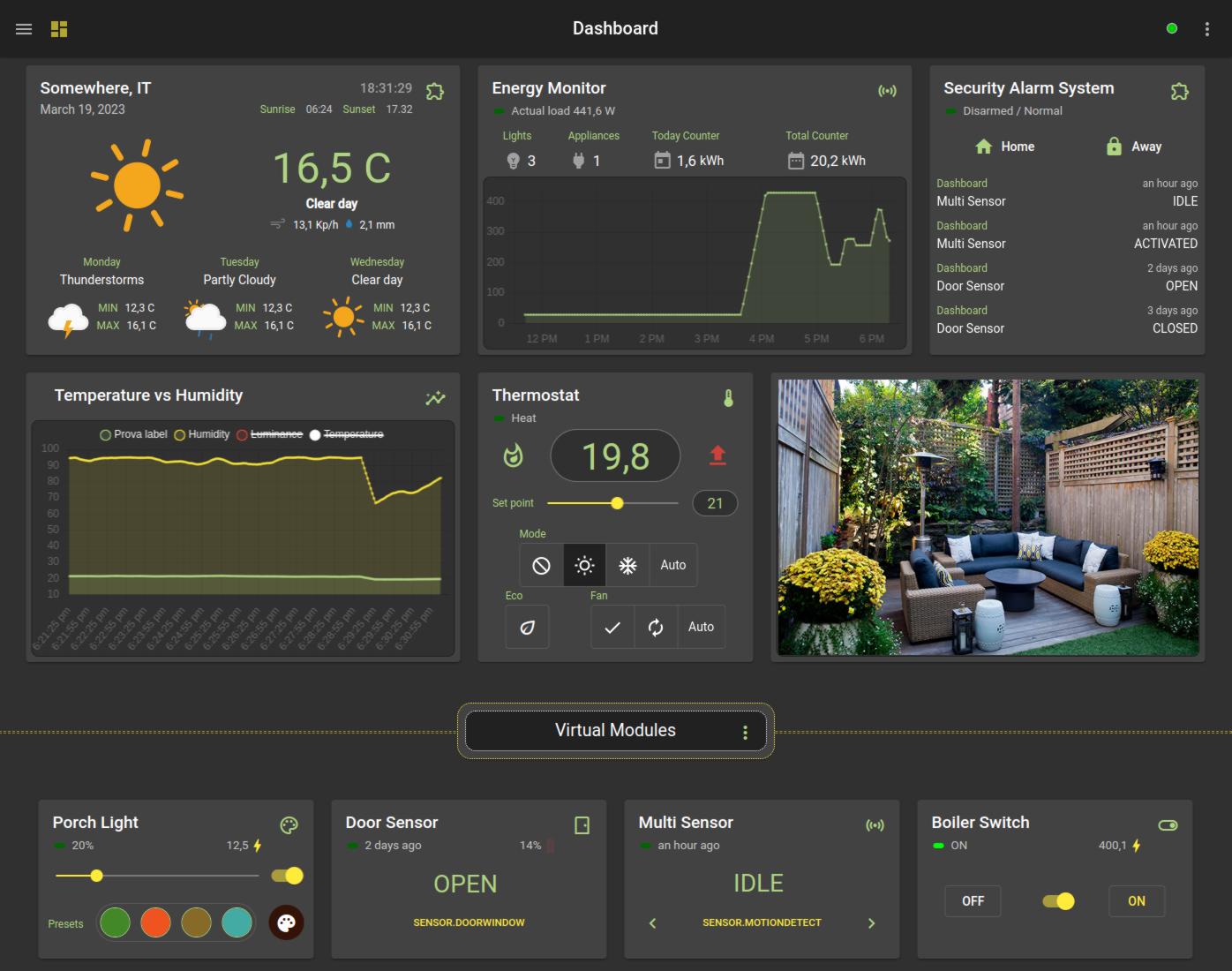
https://genielabs.github.io/HomeGenie
Download the .zip archive corresponding to the hosting operating system:
Windows
homegenie_*_win-x64.zip
Mac
homegenie_*_osx-x64.zip
Linux
homegenie_*_linux-x64.zip
Raspbian 32bit
homegenie_*_linux-arm.zip
Raspbian 64bit
homegenie_*_linux-arm64.zip
https://github.com/genielabs/HomeGenie/releases
Unzip the archive file. A new homegenie folder will be created.
Set the current directory to homegenie and run the ./HomeGenie command:
cd homegenie
./HomeGenie
To stop the application press CTRL + C
HomeGenie can be installed as a service. The procedure is different depending on the hosting operating system.
- Add a specific user for the service and copy the content of
homegeniefolder to the new user home directory:
sudo useradd homegenie
sudo cp -ar ./path-to-extracted-folder/homegenie /home/homegenie
sudo chown -R homegenie:homegenie /home/homegenie- Create the file
/etc/systemd/system/homegenie.servicewith the following content:
[Unit]
Description=HomeGenie

[Service]
Type=notify
User=homegenie
WorkingDirectory=/home/homegenie/
ExecStart=/home/homegenie/HomeGenie
Restart=on-failure

[Install]
WantedBy=multi-user.target- Refresh
SystemDconfiguration
sudo systemctl daemon-reload- Start the service and enable HomeGenie to auto-start on next system boot:
sudo systemctl start homegenie.service
sudo systemctl enable homegenie.service
Other possible commands are status, stop and disable.
See also:
- Create Linux Service (SystemD)
- Create Windows Service
HomeGenie user interface can be accessed from any web browser entering the url
http://<server_ip>:<port>/
Where server_ip is the IP address of the machine where HomeGenie is running and port can be 80
or the first available port starting from 8080.
(ex. http://192.168.1.150:8080/)
The port settings can be changed either from the maintenance page
or editing the systemconfig.xml file located in the application folder.
Depending on the hosting operating system, it might be required to run additional steps in order to allow the service to access the Serial port, USB devices and GPIO hardware.
# Audio playback utilities
sudo apt-get install alsa-utils lame
# Embedded speech synthesis engine
sudo apt-get install libttspico-utilssudo gpasswd -a homegenie dialout
sudo gpasswd -a homegenie gpiosudo apt-get install libusb-1.0-0 libusb-1.0-0-devthen, to grant access to CM15/CM19 USB devices to the homegenie user, create a new text file
with the name /etc/udev/rules.d/98-cm15_cm19.rules and add the following lines to it:
# CM15 AND CM19 X10 controllers
ATTRS{idVendor}=="0bc7", ATTRS{idProduct}=="0001", MODE="0660", GROUP="homegenie"
ATTRS{idVendor}=="0bc7", ATTRS{idProduct}=="0002", MODE="0660", GROUP="homegenie"
save the file and unplug and plug the device again.
Read the CONTRIBUTING.md file for information about contributing to this repository.
The main solution file is HomeGenie.sln that is located in the repository root.
assets/buildcommon (all) and OS specific static files that are copied after the build processassets/build/all/appThis folder contains HomeGenie user interface (YOT)assets/deployOS specific files required for bundling and deploying the app redistributablesrc/HomeGeniemain application project files (net6 and net472)src/HomeGenie.Testsproject implementing Unit Testssrc/SupportLibrariessupport and utility libraries used by HomeGeniesrc/WindowsServiceWindows specific solution for deploying HomeGenie as a Windows service (deprecated)
JetBrains Rider is the official IDE employed for developing this project.


- https://github.com/genielabs/homegenie-packages
- https://github.com/genielabs/mig-service-dotnet
- https://play.google.com/store/apps/details?id=com.glabs.homegenieplus
- https://github.com/genielabs/HomeGenie-Android-ClientLib
- https://github.com/genielabs/HomeGenie-Android
- https://github.com/genielabs/HomeGenie-WindowsPhone
- https://github.com/genielabs/homegenie-mini
- https://github.com/genielabs/yot
- https://github.com/zuixjs/zuix
THIS SOFTWARE IS PROVIDED BY THE COPYRIGHT HOLDERS AND CONTRIBUTORS "AS IS" AND ANY EXPRESS OR IMPLIED WARRANTIES, INCLUDING, BUT NOT LIMITED TO, THE IMPLIED WARRANTIES OF MERCHANTABILITY AND FITNESS FOR A PARTICULAR PURPOSE ARE DISCLAIMED. IN NO EVENT SHALL THE COPYRIGHT OWNER OR CONTRIBUTORS BE LIABLE FOR ANY DIRECT, INDIRECT, INCIDENTAL, SPECIAL, EXEMPLARY, OR CONSEQUENTIAL DAMAGES (INCLUDING, BUT NOT LIMITED TO, PROCUREMENT OF SUBSTITUTE GOODS OR SERVICES; LOSS OF USE, DATA, OR PROFITS; OR BUSINESS INTERRUPTION) HOWEVER CAUSED AND ON ANY THEORY OF LIABILITY, WHETHER IN CONTRACT, STRICT LIABILITY, OR TORT (INCLUDING NEGLIGENCE OR OTHERWISE) ARISING IN ANY WAY OUT OF THE USE OF THIS SOFTWARE, EVEN IF ADVISED OF THE POSSIBILITY OF SUCH DAMAGE.