
The Programmable Intelligence, with 100% Local Agentic AI.
www.homegenie.it



HomeGenie is a versatile, open-source platform for programmable intelligence, written in .NET. Designed for tinkerers, developers, and DIY enthusiasts, it provides a powerful, server-centric solution that runs on a wide range of hardware, from a Raspberry Pi to a dedicated home server.
With its robust Local-First, Agentic AI capabilities and extensive hardware support, HomeGenie offers the freedom to create complex automation scenarios and integrate a vast array of devices, all while ensuring your data and logic remain securely within your own network.
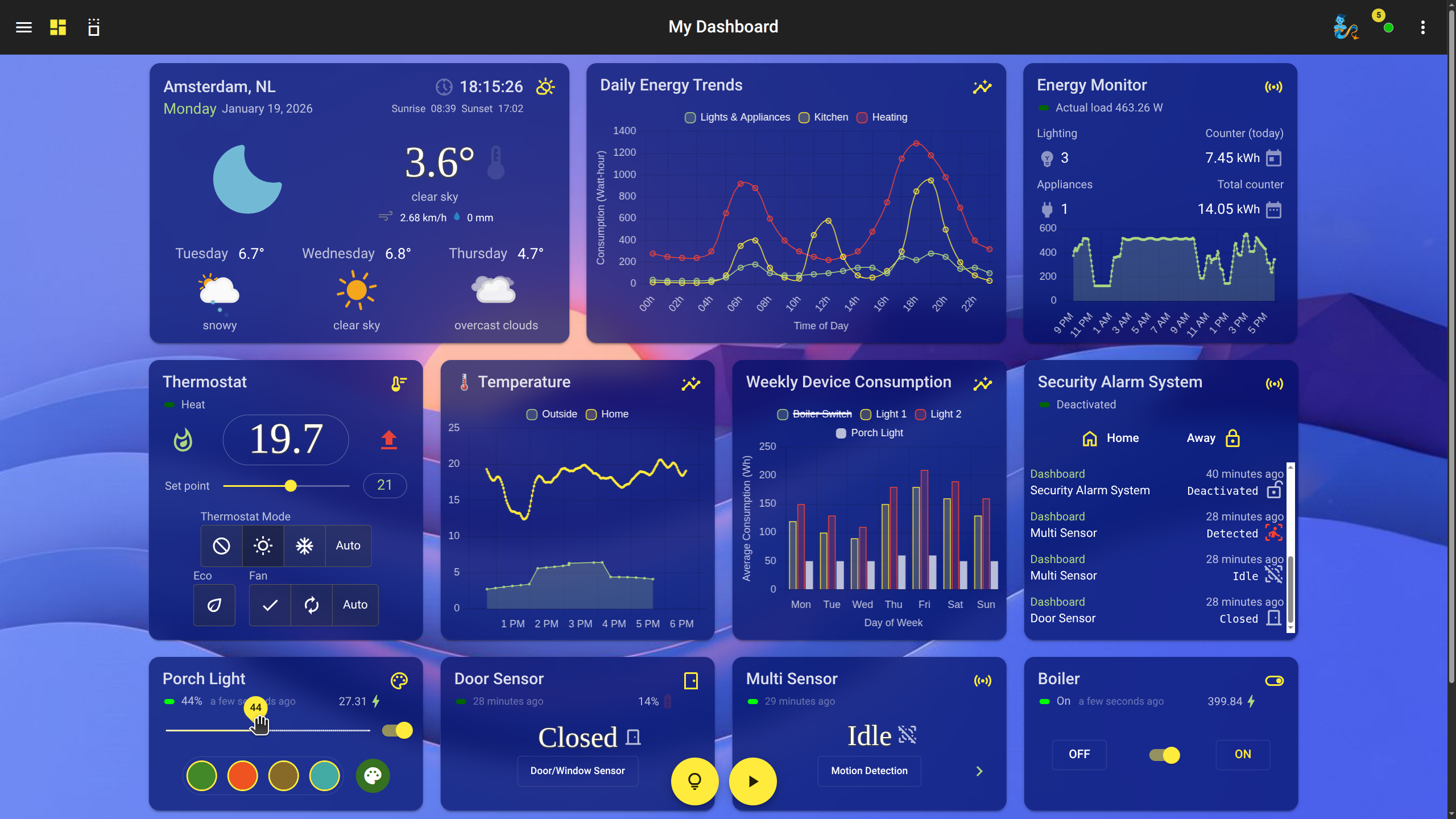
- 100% Local Agentic AI: Run state-of-the-art LLMs directly on your HomeGenie server for autonomous reasoning, context awareness, and natural language control. Your data stays private, your intelligence stays local.
- AI Vision Suite: Full integration of YOLO (Object Detection, Instance Segmentation, Pose Estimation) directly on server, ESP32-CAM modules, and generic IP cameras.
- Universal API & Programmability: Automate anything with a fluent API programmable in C#, JavaScript, and Python. Create custom programs and widgets with full developer tools.
- Advanced Scheduler with Genie Commands: Supports extended cron expressions, variables, conditions, and AI-driven natural language tasks for flexible automations.
- Customizable Dashboard & Widgets: A modern, responsive UI with a powerful built-in editor to create and customize your own widgets using HTML, JavaScript, and CSS.
- Multi-protocol Support: Integrated drivers for X10, Z-Wave, ZigBee, GPIO, SPI, I2C, IR/RF, and more.
- Smart Display & FPV Car Integration: Transform ESP32 hardware into interactive smart displays or AI-powered FPV robotic platforms.
- Visual Programming: Create complex scenarios intuitively with the Visual Program editor—no coding skills required.
- Voice Control & i18n: Integrated support for voice commands and a fully localized UI across over 90 languages.
- Extensible: Features groups, configuration backup, a package repository, and much more.
Full Features and Image Gallery
For detailed guides, API references, and tutorials, visit the official documentation website:
https://genielabs.github.io/HomeGenie

You can find the latest release assets on the GitHub Releases page.
Download the .zip archive corresponding to your operating system and architecture:
| Platform | Archive Name |
|---|---|
| Windows (x64) | homegenie_*_win-x64.zip |
| macOS (x64) | homegenie_*_osx-x64.zip |
| Linux (x64) | homegenie_*_linux-x64.zip |
| Raspberry Pi (32-bit) | homegenie_*_linux-arm.zip |
| Raspberry Pi (64-bit) | homegenie_*_linux-arm64.zip |
| .NET Framework 4.7.2 | homegenie_*_net472.zip |
After downloading, unzip the archive. A new homegenie folder will be created.
Navigate to the homegenie directory and execute the HomeGenie command:
cd homegenie
./HomeGenie
To stop the application, press CTRL + C.
HomeGenie can be run directly from a terminal for easy setup and testing, or installed as a system service for continuous, unattended operation.
-
(Recommended) Create a dedicated user for the service and move the application files:
# Create a new system user named 'homegenie' with its home directory
sudo useradd -r -m -s /bin/false homegenie

# Copy the application files into the new home directory
# Assumes you are in the directory where you extracted the zip
sudo cp -ar ./homegenie/* /home/homegenie/

# Ensure the ownership of all files is correct
sudo chown -R homegenie:homegenie /home/homegenie
-
Create a service definition file at
/etc/systemd/system/homegenie.service:[Unit] Description=HomeGenie Automation Server After=network.target [Service] Type=notify User=homegenie Group=homegenie WorkingDirectory=/home/homegenie/ ExecStart=/home/homegenie/HomeGenie Restart=on-failure RestartSec=15s [Install] WantedBy=multi-user.target
-
Reload the systemd daemon, then start and enable the service:
sudo systemctl daemon-reload
sudo systemctl start homegenie.service
sudo systemctl enable homegenie.service
You can check the service status with
sudo systemctl status homegenie.service.
HomeGenie can be installed as a Windows Service using the built-in commands. Open a Command Prompt as an Administrator, navigate to the homegenie directory, and run:
HomeGenie.exe --service install
HomeGenie.exe --service start
For more options, see the official .NET documentation.
Once running, the HomeGenie user interface can be accessed from any web browser at: http://<server_ip>:<port>/
<server_ip>is the IP address of the machine running HomeGenie.- The default
<port>is 80, or the first available port starting from 8080.
You can find the exact address and port used by checking the serviceaddress.txt file in the homegenie application folder.
To grant HomeGenie access to hardware like serial ports, USB devices, and GPIO, you may need to run additional commands.
# For audio playback
sudo apt install alsa-utils lame
# For embedded text-to-speech
sudo apt install libttspico-utilsAdd the homegenie user to the dialout and gpio groups:
sudo usermod -a -G dialout homegenie
sudo usermod -a -G gpio homegenie- Install the required library:
sudo apt install libusb-1.0-0
- Create a udev rule to grant access. Create the file
/etc/udev/rules.d/98-homegenie.ruleswith the following content:# CM15 and CM19 X10 USB controllers SUBSYSTEM=="usb", ATTRS{idVendor}=="0bc7", ATTRS{idProduct}=="0001", MODE="0660", GROUP="dialout" SUBSYSTEM=="usb", ATTRS{idVendor}=="0bc7", ATTRS{idProduct}=="0002", MODE="0660", GROUP="dialout" - Reload the udev rules and reconnect the device:
sudo udevadm control --reload-rules && sudo udevadm trigger
Contributions are welcome! Please read the CONTRIBUTING.md file for guidelines.
The main solution file is HomeGenie.sln located in the repository root.
src/HomeGenie: The main application project, multi-targeted for.NET Framework 4.7.2and modern.NET (6.0+).src/HomeGenie.Tests: Unit and integration tests.src/SupportLibraries: Utility libraries used by HomeGenie.assets/: Contains build assets, UI source code, and deployment scripts.
- https://github.com/genielabs/mig-service-dotnet
- https://github.com/genielabs/homegenie-mini
- https://play.google.com/store/apps/details?id=com.glabs.homegenieplus
- https://github.com/zuixjs/zuix
This software is provided "as is", without warranty of any kind. See the LICENSE file for more details.