Skip to content

Conversation

@ghost
Copy link

@ghost ghost commented Jul 20, 2019

No description provided.

@ghost
Copy link
Author

ghost commented Jul 20, 2019

QT linguist changed ts version. Should I change it back?

@ghost
Copy link
Author

ghost commented Jul 20, 2019

Should I translate PINN options?

@ghost
Copy link
Author

ghost commented Jul 20, 2019

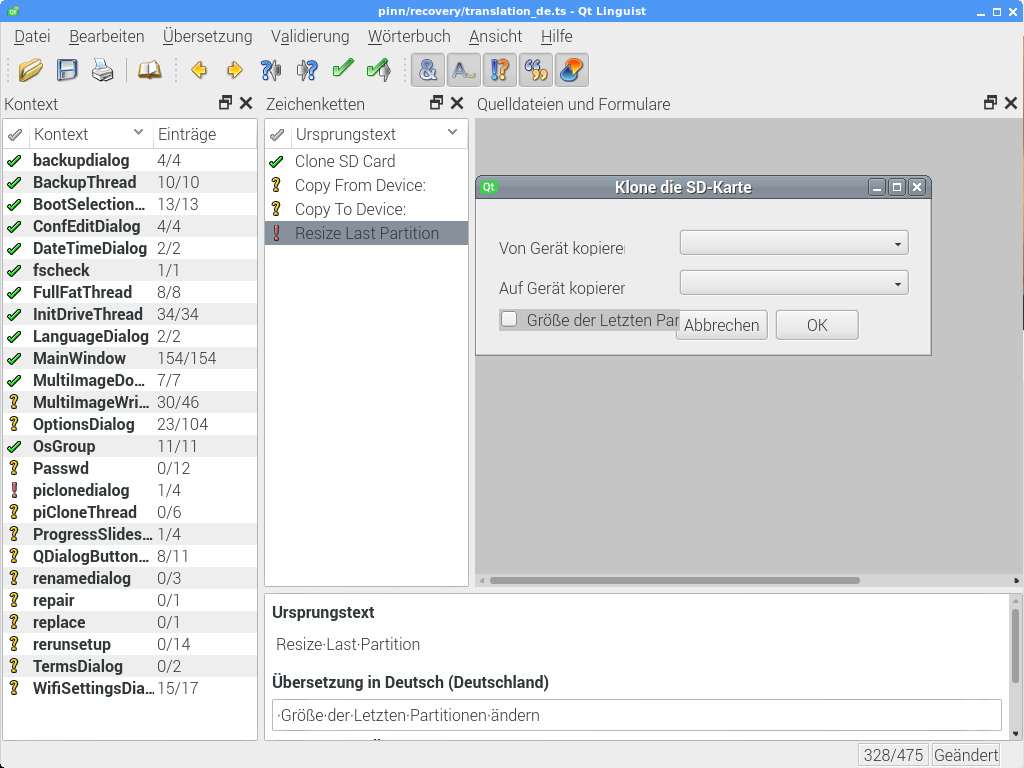
image

Some text doesn't fit into his position
See issue #303

@ghost
Copy link
Author

ghost commented Jul 20, 2019

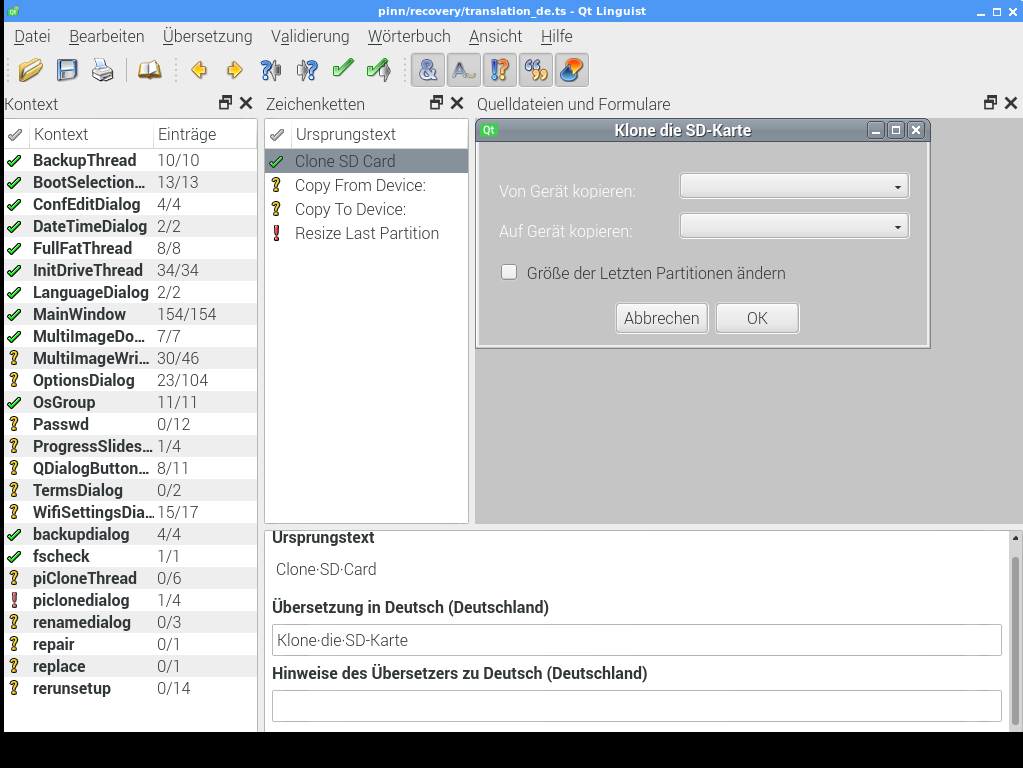
Here's my fix for this:

@ghost ghost mentioned this pull request Jul 20, 2019
@ghost
Copy link
Author

ghost commented Jul 20, 2019

image
It looks like that.

@ghost
Copy link
Author

ghost commented Jul 21, 2019

I can't translate this:
<message> <location filename="rerunsetup.cpp" line="57"/> <source>Cannot find setup script for </source> <translation type="unfinished"></translation> </message>

For German, the text after for must be a variable, German would be

Setupskript für %1 kann nicht gefunden werden

Because you can't place %1 at the end in German Translation (grammatical issue)

@procount
Copy link
Owner

Ja ich weis.
@lurch is working on this to improve the parameterisation. Like I said before, it might be better to wait until this is finished because it will make the translation easier for you.

@ghost
Copy link
Author

ghost commented Jul 21, 2019

Okay, I'm going to wait until he's finished.

RaspberryPiFan added 2 commits July 21, 2019 11:35
Last update until @lurch added the new translations
@lurch
Copy link
Contributor

lurch commented Jul 21, 2019

@lurch is working on this to improve the parameterisation

...which in turn, is also waiting on me fixing #249 ... 😅

QT linguist changed ts version. Should I change it back?

@procount what version of QT Linguist are you using? @raspberrypifan what version are you using?

@lurch
Copy link
Contributor

lurch commented Jul 21, 2019

And WRT the (translated) text not fitting in the GUI, can you check if you see the same behaviour in a (running) build of PINN with your updated translations included, or is this merely a display-bug in QT Linguist?

@ghost
Copy link
Author

ghost commented Jul 22, 2019

And WRT the (translated) text not fitting in the GUI, can you check if you see the same behaviour in a (running) build of PINN with your updated translations included, or is this merely a display-bug in QT Linguist?

It's building, I'm going to ckeck after it's finished.

QT linguist changed ts version. Should I change it back?

@procount what version of QT Linguist are you using? @raspberrypifan what version are you using?

I'm using qt 5.11.3

@lurch
Copy link
Contributor

lurch commented Jul 22, 2019

I'm using qt 5.11.3

Ahhh, I suspect that @procount is using QT Linguist 4, since QT4 is what PINN is built with. In which case you should probably revert the .ts version back to being qt4-compatible.

<location filename="backupthread.cpp" line="206"/>
<source>%1: Checksumming (%2)</source>
<translation type="unfinished"></translation>
<translation></translation>
Copy link
Contributor

Choose a reason for hiding this comment

The reason will be displayed to describe this comment to others. Learn more.

Empty translation??

Copy link
Author

Choose a reason for hiding this comment

The reason will be displayed to describe this comment to others. Learn more.

I'm going to fix it soon.

@bovirus
Copy link
Contributor

bovirus commented Jul 22, 2019

@lurch

As I know the QT Linguist file edited with QT Linguist 5 are compatible and can be opened by QT Linguist 4.

The only difference is in the header

QT Linguist 4
TS version="2.0" language="de" sourcelanguage="en"

QT Linguist 5
TS version="2.1" language="de" sourcelanguage="en"

But the TS version will be replaced at next PINN rebuild.

@raspberrypifan

You can use QT Linguist 5 or 4 as you like.

@procount
Copy link
Owner

Correct. But AFAIK it just changes the version of ts file from 2.0 to 2.1. Never seen any other differences.

@bovirus
Copy link
Contributor

bovirus commented Jul 22, 2019

For all translator here you can find a list of QT-Linguist Editor version for Windows.

https://mega.nz/#F!KQhwUAKb!uaHNRZDdTK-c9HBdLN2XVQ

Qt-Linguist-x.xxx-platform-installer.exe
Installer (Setup version)

Qt-Linguist-x.xxx-platform-portable.zip
Portable (zip archive with several files) - Require archive decompression - Not required installation

Qt-Linguist-x.xxx-platform-standalone.exe
Portable (single exe file) - Not require decompression - Not required installation

Where platform could be x86 (32bit) or x64 (64bit).

32bit can run also on 64bit Windows OS.
64bit can run only on 64bit Windows OS.

@procount

Please consider to add info translation in readme and also if you want this repository link.

@lurch
Copy link
Contributor

lurch commented Jul 22, 2019

Correct. But AFAIK it just changes the version of ts file from 2.0 to 2.1. Never seen any other differences.

Ah, fair enough. But IMHO it's probably still worth deciding on which version you want to have stored in the repo, in order to avoid the TS version number ping-ponging back and forth depending on who last updated it? (or maybe I'm just being too pedantic? 🤷‍♂️ )

@bovirus
Copy link
Contributor

bovirus commented Jul 22, 2019

@lurch

To have a match between TS version on TS repository you should use QT Linguist 4.8.x.

As I explained for me is not a problem because if I edit a file with TS vesrion 2.1 in the haeder PINN project can read it.

And when the developer run lupdate xxx.pro (project file name) it re-create TS 2.0 in all headers.

Added to my rewpository QT Linguist 4.8.7 standalone (single exe - no installation required - only one fiel).

https://mega.nz/#!WZQEVKbb!C2AMwC3_mslPaNcVDQkM-ylCL5J9ybhZ-v9TfYYzi5A

The best one to edit and save .ts PINN translation file.

@procount
Copy link
Owner

(or maybe I'm just being too pedantic? 🤷‍♂ )

How could you say such a thing! 😉

TBH, as I've never experienced a problem with differing .ts versions, I agree with @bovirus and I will accept either version. QT Linguist 4.8 (2.0) is preferred, but I will accept QT Linguist 5 (2.1) as well.
I'm just thankful that people are interested enough to do the translation!

@ghost
Copy link
Author

ghost commented Jul 22, 2019

And WRT the (translated) text not fitting in the GUI, can you check if you see the same behaviour in a (running) build of PINN with your updated translations included, or is this merely a display-bug in QT Linguist?

It's only a display bug in QT Linguist.

For all translator here you can find a list of QT-Linguist Editor version for Windows.

https://mega.nz/#F!KQhwUAKb!uaHNRZDdTK-c9HBdLN2XVQ

Qt-Linguist-x.xxx-platform-installer.exe
Installer (Setup version)

Qt-Linguist-x.xxx-platform-portable.zip
Portable (zip archive with several files) - Require archive decompression - Not required installation

Qt-Linguist-x.xxx-platform-standalone.exe
Portable (single exe file) - Not require decompression - Not required installation

Where platform could be x86 (32bit) or x64 (64bit).

32bit can run also on 64bit Windows OS.
64bit can run only on 64bit Windows OS.

@procount

Please consider to add info translation in readme and also if you want this repository link.

I use Debian GNU/Linux.

@bovirus
Copy link
Contributor

bovirus commented Jul 22, 2019

@raspberrypifan
I believe that you installed qt4-dev-tools.

If you want when you will post the updated German language I will check it with qt/po check tools.

RaspberryPiFan added 5 commits July 22, 2019 20:53
buildroot folder with old buildroot is included for building problems
Added BUILDME.sh for old buildroot
@ghost
Copy link
Author

ghost commented Jul 22, 2019

I included this in the buildroot fix.

@ghost ghost closed this Jul 22, 2019
@lurch lurch mentioned this pull request Jul 22, 2019
24 tasks
This pull request was closed.
Sign up for free to join this conversation on GitHub. Already have an account? Sign in to comment

Labels

None yet

Projects

None yet

Development

Successfully merging this pull request may close these issues.

3 participants