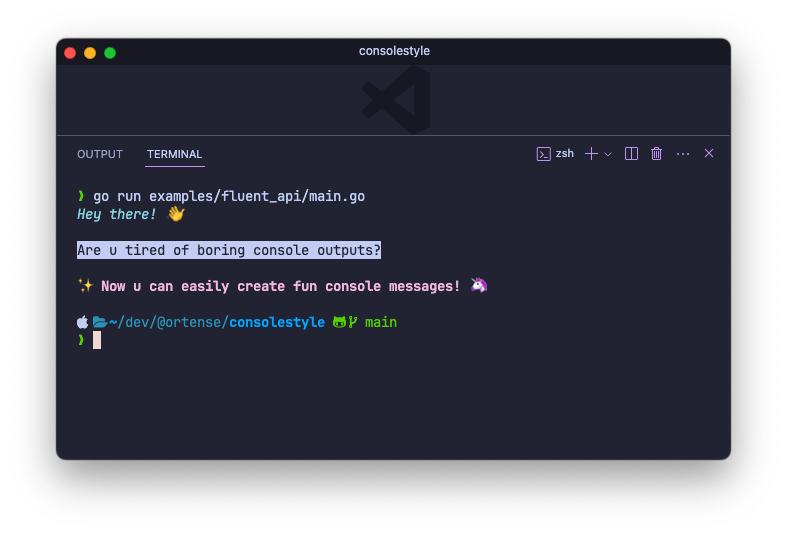
A lightweight and expressive package to style your console output with ease, adding colors, backgrounds, and various text styles to enhance your command-line experience.
go get github.com/ortense/consolestyleYou can use the fluent api of Style func.
import (
  "fmt"
  "github.com/ortense/consolestyle"
)

func main() {
  message := consolestyle.
    Style("Hey there! 👋").Cyan().Italic().
    EmptyLine().
    NewLine("Are u tired of boring console outputs?").Inverse().
    EmptyLine().
    NewLine("✨ Now u can easily create fun console messages! 🦄").Magenta().Bold()

  fmt.Println(message)
}
Alternatively, you can choose specific functions to apply styles to your console output.
import (
  "fmt"
  cs "github.com/ortense/consolestyle"
)

func main() {
  fmt.Println(cs.Italic(cs.Green("\"Simplicity is the ultimate sophistication.\"")))
  fmt.Println(cs.Dim("- Leonardo da Vinci"))
}
More details in the complete documentation.
- Easily style your console output with a fluent API.
- Apply a wide range of text colors, backgrounds, and styles.
- Enhance your command-line interface with vibrant and visually appealing messages.
Red(): Apply red text color.Green(): Apply green text color.Yellow(): Apply yellow text color.Blue(): Apply blue text color.Magenta(): Apply magenta text color.Cyan(): Apply cyan text color.BgRed(): Apply red background color.BgGreen(): Apply green background color.BgYellow(): Apply yellow background color.BgBlue(): Apply blue background color.BgMagenta(): Apply magenta background color.BgCyan(): Apply cyan background color.Inverse(): Apply inverted colorsBold(): Apply bold text style.Dim(): Apply dim text style.Italic(): Apply italic text style.Underline(): Apply underline text style.Strike(): Apply strike-through text style.
This package is licensed under the MIT License. See the LICENSE file for details.