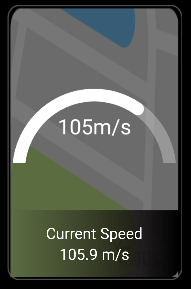
The SpeedWidget is an Android widget designed to display the current speed in real-time on the home page of your Android device. This widget provides users with a convenient way to monitor their current speed without the need for a separate app.
The SpeedService is a component of the SpeedWidget that implements the IBaseGpsListener interface to obtain the current speed information. This service is responsible for interacting with the device's GPS system and retrieving the real-time speed data.
The SpeedAppWidget is the main component that brings the SpeedWidget to life. It starts the SpeedService as a foreground service, ensuring that the speed monitoring continues even when the widget is not actively displayed. This widget updates both the image and text elements based on the current information obtained from the SpeedService.
To integrate the SpeedWidget into your Android device, follow these steps:
- Download the SpeedWidget APK from [insert download link].
- Install the APK on your Android device.
- Add the SpeedWidget to your home page by long-pressing on an empty space and selecting "Widgets." Look for the SpeedWidget in the list and drag it to your desired location.