Ping function in Excel.
Excelのユーザー定義関数としてPingを実装しました。 単純に「=Ping("Target")」と書くだけで、実行できます。
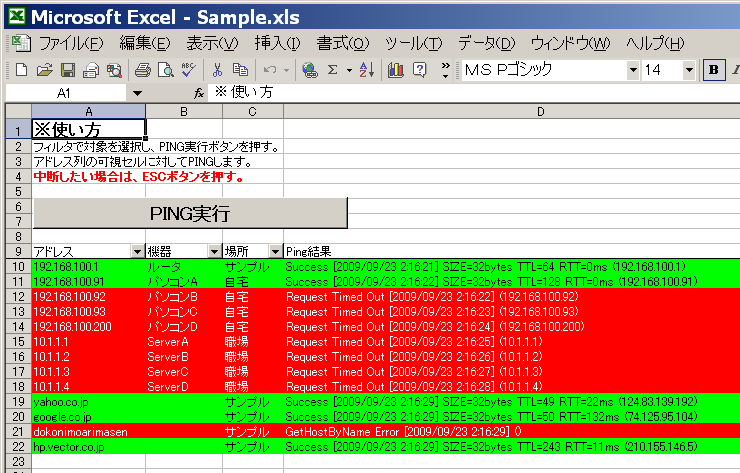
「ICMPUtil.bas」を使用したいファイルにインポートして使ってください。 面倒であれば、サンプルファイルを書き換えて使って下さい。 使用可能なユーザー定義関数は、下記の1つのみです。関数の戻り値は文字列です。
Ping ( 対象ホスト, [ 成功時の文字列 , 失敗時の文字列 ] )
IPアドレスかホスト名をあらわす文字列。 IPアドレスはドット付き十進表記が確実です(127.0.0.1 など)。 ホスト名の場合、IPアドレスを引き解決できればそのアドレスを利用します。 解決できない場合は、失敗(GetHostByName Error)となります。
応答があった場合に関数が返す値を設定します。 省略すると下記の規定値が利用されます。
$S [$D] SIZE=$Bbytes TTL=$T RTT=$Rms ($A)
文字列にあるDollar($)で始まる記号は、実行時にそれぞれの 値に変換されます。対応は下記の通りです。
$S : 応答結果を文字列で返します。成功の場合は「Success」です。
$C : 応答結果の数値を表示します。ほぼ使いません。
$A : 応答を返したホストのIPアドレスです。
$B : 送信したパケットのデータサイズです。
$T : パケットのTTL(TimeToLive)です。
$R : 送信してから応答が帰ってくるまでの時間(ミリ秒)です。
$D : Now関数を使って、現在の日時を返します。
$$,$# : 「$」となります。文字列内に「$」を使いたい場合に。
このルールから、前述の規定値はたとえばこんな値を返します。
Success [2009/09/23 14:38:39] SIZE=32bytes TTL=128 RTT=0ms (127.0.0.1)
応答がない場合か、ホスト名の名前解決ができない場合に 関数が返す値を設定します。 省略すると下記の規定値が利用されます。
$S [$D] ($A)
変換ルールは成功時と同じため、たとえばこんな値が返ります。
Request Timed Out [2009/09/23 14:38:41] (192.168.100.1)
Import "ICMPUtil.bas" to the file and Ping functions can be used.
The return value of the function is string.
Ping ( target-host, [ success-string , failure-string ] )
target-host is a character string representing IP address or hostname.
If hostname can not be resolved, will fail (GetHostByName Error).
Sets the response format returned by the function. If omitted, the following default values are used.
$S [$D] SIZE=$Bbytes TTL=$T RTT=$Rms ($A)
Dollar symbols are converted to their actual values at runtime.
$S : result as a character string. Success is "Success".
$C : the numerical value of the response. I almost do not use it.
$A : IP address of the host that returned the response.
$B : data size of the transmitted packet.
$T : TTL (TimeToLive) of the packet.
$R : time (msec) from sending to when the response comes back.
$D : Returns the current date and time using the NOW function。
$$,$# : print character "$"
From this rule, for example, such a value will be returned.
Success [2009/09/23 14:38:39] SIZE=32bytes TTL=128 RTT=0ms (127.0.0.1)
Sets the response format returned by the function when there is no response, or when host name name resolution can not be performed. If omitted, the following default values are used.
$S [$D] ($A)
The conversion rule is the same as on success, so, for example, this value will be returned.
Request Timed Out [2009/09/23 14:38:41] (192.168.100.1)
Excel on Windows.