Automatic code review for git commits using AI agents (Claude Code, Codex, Gemini, Copilot, OpenCode).
curl -fsSL https://roborev.io/install.sh | bashOr with Go:
go install github.com/roborev-dev/roborev/cmd/roborev@latestEnsure $GOPATH/bin is in your PATH:
export PATH="$PATH:$(go env GOPATH)/bin"cd your-repo
roborev init # Install post-commit hook
git commit -m "..." # Reviews happen automatically
roborev tui # View reviews in interactive UINote: Hook installation automatically detects your git hook manager (Husky, etc.) via core.hooksPath.
| Command | Description |
|---|---|
roborev init |
Initialize roborev in current repo |
roborev status |
Show daemon and queue status |
roborev tui |
Interactive terminal UI |
roborev show [sha] |
Display review for commit |
roborev show --job <id> |
Display review by job ID |
roborev review <sha> |
Queue a commit for review |
roborev review <start> <end> |
Queue a commit range (inclusive) |
roborev review --branch |
Review all commits on current branch |
roborev review --since <commit> |
Review commits since a specific commit |
roborev review --dirty |
Review uncommitted changes |
roborev review --reasoning <level> |
Set reasoning depth (thorough/standard/fast) |
roborev prompt "<text>" |
Run ad-hoc prompt with AI agent |
roborev respond <id> [msg] |
Add a response/note to a review |
roborev address <id> |
Mark review as addressed |
roborev refine |
Auto-fix failed reviews using AI |
roborev repo list |
List tracked repositories |
roborev repo rename <old> <new> |
Rename a repository's display name |
roborev stream |
Stream review events (JSONL) |
roborev daemon start|stop|restart |
Manage the daemon |
roborev install-hook |
Install git post-commit hook |
roborev uninstall-hook |
Remove git post-commit hook |
roborev update |
Update roborev to latest version |
roborev skills install |
Install agent skills (Claude Code, Codex) |
roborev sync status |
Show PostgreSQL sync status |
roborev sync now |
Trigger immediate sync |
roborev version |
Show version information |
Use --branch to review all commits since your branch diverged from main:
roborev review --branch              # Review branch vs auto-detected main/master
roborev review --branch --base dev   # Review branch vs specific base
roborev review --branch --wait       # Wait for review and show result
This is useful for pre-merge reviews of entire feature branches.
Use --since to review commits since a specific point:
roborev review --since HEAD~5       # Review last 5 commits
roborev review --since abc123       # Review commits since abc123 (exclusive)
roborev review --since v1.0.0       # Review commits since a tag
The range is exclusive of the starting commit (like git's .. range syntax). Unlike --branch, this works on any branch including main.
Use --dirty to review working tree changes before committing:
roborev review --dirty           # Queue review of uncommitted changes
roborev review --dirty --wait    # Wait for review and show result
Includes staged changes, unstaged changes to tracked files, and untracked files.
The --wait flag exits with code 0 for passing reviews and code 1 for failing reviews, useful for CI:
if ! roborev review --dirty --wait --quiet; then
    echo "Review failed - please address findings"
    exit 1
fiUse prompt to run arbitrary prompts with AI agents for tasks beyond code review:
roborev prompt "Explain the architecture of this codebase"
roborev prompt --wait "What does the main function do?"
roborev prompt --agent claude-code "Refactor error handling in main.go"
roborev prompt --reasoning thorough "Find potential security issues"
roborev prompt --agentic "Add error handling to main.go"
cat instructions.txt | roborev prompt --wait
Flags:
| Flag | Description |
|---|---|
--wait |
Wait for job to complete and show result |
--agent |
Agent to use (default: from config) |
--reasoning |
Reasoning level: fast, standard, or thorough |
--no-context |
Don't include repository context in prompt |
--agentic |
Enable agentic mode (allow file edits and commands) |
--yolo |
Alias for --agentic |
--quiet |
Suppress output (just enqueue) |
By default, prompts run in review mode (read-only). Use --agentic (or --yolo) to enable write operations (file edits, bash commands) for tasks that need to modify your codebase.
By default, prompts include context about the repository (name, path, and any project guidelines from .roborev.toml). Use --no-context for raw prompts.
Manage repositories tracked by roborev:
roborev repo list                    # List all repos with review counts
roborev repo show my-project         # Show repo details and stats
roborev repo rename old-name new-name # Rename display name
roborev repo delete old-project      # Remove from tracking
roborev repo merge source target     # Merge reviews into another repo
Subcommands:
| Command | Description |
|---|---|
repo list |
List all repositories with review counts |
repo show <name> |
Show detailed stats for a repository |
repo rename <old> <new> |
Rename a repository's display name |
repo delete <name> |
Remove repository from tracking |
repo merge <src> <dst> |
Move all reviews to another repo |
The rename command is useful for grouping reviews after project renames or when you want a friendlier display name than the directory name. The merge command consolidates duplicate entries (e.g., from symlinks or path changes).
Use refine to automatically address failed reviews on your branch:
roborev refine                       # Fix failed reviews using default agent
roborev refine --agent claude-code   # Use specific agent for addressing findings
roborev refine --max-iterations 5    # Limit fix attempts
roborev refine --quiet               # Show elapsed time instead of agent output
roborev refine --reasoning thorough  # Use thorough reasoning (slower, more accurate)
roborev refine --since abc123        # Refine commits since a specific commit
roborev refine --since HEAD~3        # Refine the last 3 commits (works on main branch)
flowchart TD
Start([refine]) --> Find[Find oldest<br/>failed review]
Find --> A{Found?}
A -->|No| Branch[Run whole-branch review]
Branch --> C{Pass?}
C -->|Yes| Done([Done - all reviews pass])
C -->|No| Fix
A -->|Yes| Fix[AI agent addresses findings]
Fix --> Commit[Commit fix]
Commit --> Wait[Wait for re-review]
Wait --> Pass{Pass?}
Pass -->|Yes| Find
Pass -->|No| MaxCheck{Max iterations?}
MaxCheck -->|No| Fix
MaxCheck -->|Yes| Fail([Exit - max reached])
The loop processes commits oldest-first. When a fix fails review, it keeps addressing that fix until it passes before moving to the next oldest failed commit. Passing reviews are automatically marked as addressed. When no individual failed reviews remain, a whole-branch review runs; if that passes, the refiner exits successfully.
Requires a clean working tree. By default, refine works on feature branches (comparing against main). Use --since to refine specific commits on any branch, including main.
The refine command runs AI agents without sandboxing so they can install dependencies, run builds, and execute tests. This is safe for your own code, but use caution with untrusted sources:
| Scenario | Risk Level | Recommendation |
|---|---|---|
| Your own branches | Low | Safe to run directly |
| PRs from trusted contributors | Low-Medium | Review changes before refining |
| PRs from strangers / untrusted code | High | Use isolation (see below) |
Isolation options for untrusted code:
- Run in a container or VM
- Use a low-privilege user account
- Use a disposable cloud instance
The risk is equivalent to running claude --dangerously-skip-permissions or codex --dangerously-bypass-approvals-and-sandbox manually - malicious code could potentially access credentials, exfiltrate data, or modify your system.
Create .roborev.toml in your repo root:
agent = "claude-code"      # AI agent to use
review_context_count = 5   # Recent reviews to include as context
display_name = "backend"   # Custom name shown in TUI (optional)
excluded_branches = ["wip", "scratch"]  # Branches to skip reviews on

# Reasoning levels: thorough, standard, fast
review_reasoning = "thorough"  # For code reviews (default: thorough)
refine_reasoning = "standard"  # For refine command (default: standard)

# Project-specific review guidelines
review_guidelines = """
No database migrations needed - no production databases yet.
Prefer composition over inheritance.
All public APIs must have documentation comments.
"""Create ~/.roborev/config.toml:
default_agent = "codex"
server_addr = "127.0.0.1:7373"
max_workers = 4
job_timeout = "10m"  # Per-job timeout (default: 10m)
Override the data directory with ROBOREV_DATA_DIR:
export ROBOREV_DATA_DIR=/custom/path # Default: ~/.roborevClaude Code uses your Claude subscription by default. roborev deliberately ignores ANTHROPIC_API_KEY from the environment to avoid unexpected API charges.
To use Anthropic API credits instead:
# ~/.roborev/config.toml
anthropic_api_key = "sk-ant-..."
Codex uses the authentication configured in your Codex installation.
- CLI flags (
--agent,--reasoning) - Per-repo
.roborev.toml - Global
~/.roborev/config.toml - Auto-detect first available agent; defaults to thorough for reviews, standard for refine
Control how deeply the AI analyzes code:
| Level | Description | Best For |
|---|---|---|
thorough |
Deep analysis with extended thinking | Code reviews (default) |
standard |
Balanced analysis | Refine command (default) |
fast |
Quick responses | Rapid feedback |
Override per-command:
roborev review --reasoning fast      # Quick review
roborev refine --reasoning thorough  # Careful fixes
The reasoning level maps to agent-specific features (Codex only today):
- Codex:
model_reasoning_effort(high/medium/low) - Claude Code: Not yet applied (value stored only)
- Other agents: Not yet applied (value stored only)
Use review_guidelines to give the AI reviewer project-specific context:
- Suppress irrelevant warnings ("no migrations needed yet")
- Enforce conventions ("use tabs not spaces")
- Add domain criteria ("check for PII exposure")
When a commit diff exceeds 250KB, roborev omits it from the prompt and provides only the commit hash. The AI agent can then inspect changes using its own tools (git show <sha>).
For --dirty reviews, diffs are limited to 200KB since uncommitted changes cannot be easily inspected by the agent. If your dirty diff exceeds this limit, commit your changes in smaller chunks.
| Agent | CLI Command | Install |
|---|---|---|
codex |
codex |
npm install -g @openai/codex |
claude-code |
claude |
npm install -g @anthropic-ai/claude-code |
gemini |
gemini |
npm install -g @google/gemini-cli |
copilot |
copilot |
npm install -g @github/copilot |
opencode |
opencode |
npm install -g opencode-ai |
roborev auto-detects installed agents and falls back in order: codex → claude-code → gemini → copilot → opencode.
Agents run in one of two modes:
| Mode | Tools Available | Used By |
|---|---|---|
| Review (default) | Read, Glob, Grep | roborev review, roborev prompt |
| Agentic | Read, Glob, Grep, Edit, Write, Bash | roborev refine, roborev prompt --agentic |
Review mode is read-only - agents can inspect code but cannot make changes. This is the safe default for automated reviews triggered by post-commit hooks.
Agentic mode allows agents to edit files and run commands. Enable it in three ways:
- Per-job: Use
roborev prompt --agentic(or--yolo) - Per-command: The
refinecommand automatically enables agentic mode - Globally: Set
allow_unsafe_agents = truein~/.roborev/config.tomland restart daemon
Agent Support:
| Agent | Agentic Support |
|---|---|
codex |
Full (uses --dangerously-bypass-approvals-and-sandbox) |
claude-code |
Full (uses --dangerously-skip-permissions) |
gemini |
Full (uses --yolo and --allowed-tools) |
copilot |
Limited (requires manual approval for actions) |
opencode |
Full (auto-approves in non-interactive mode) |
Install slash commands that let AI agents fix review findings directly:
roborev skills install| Skill | Description |
|---|---|
/roborev:address <job_id> |
Fetch a review and fix its findings |
/roborev:respond <job_id> [message] |
Add a response to document changes |
When you receive a review notification like "Review #1019: Fail", ask your agent:
/roborev:address 1019
The agent fetches the review, reads relevant files, fixes issues by priority (high severity first), runs tests, and offers to commit. Skills are updated automatically with roborev update.
For Codex, use $roborev:address and $roborev:respond instead.
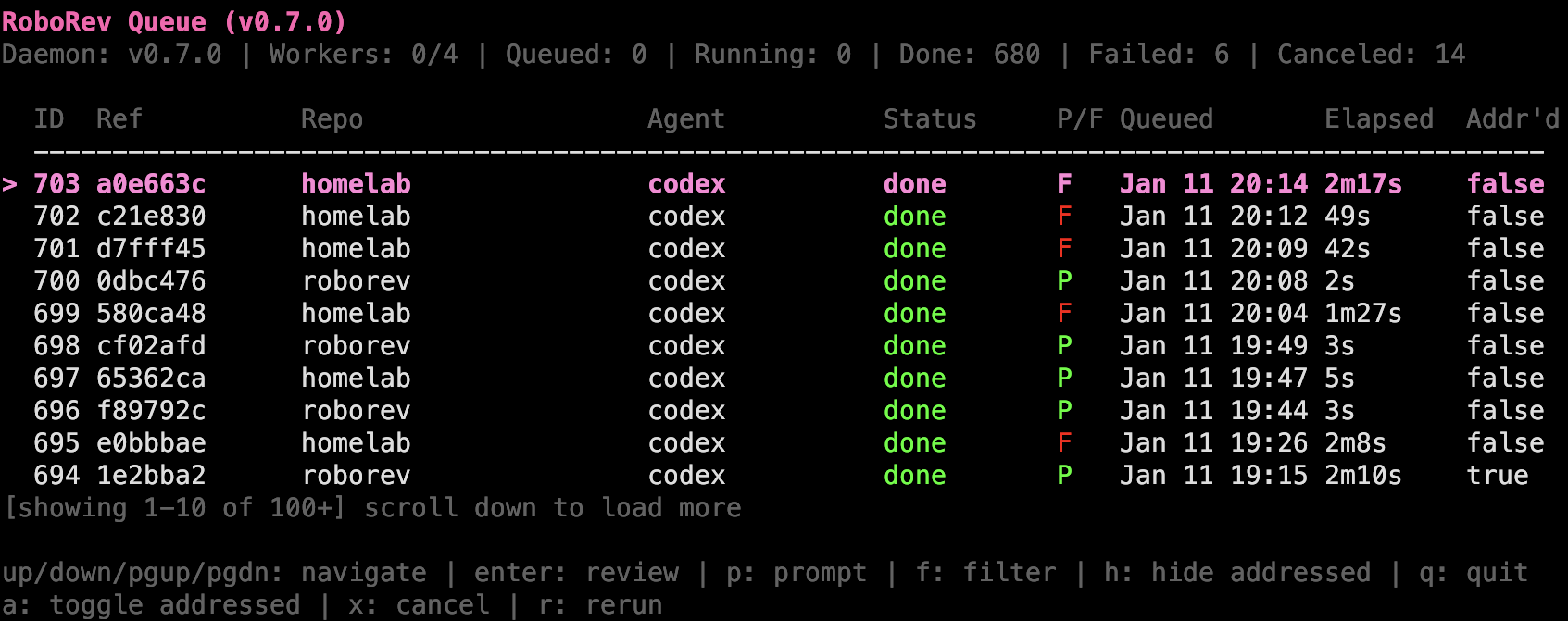
The interactive terminal UI (roborev tui) provides a real-time view of the review queue.
Queue View:
| Key | Action |
|---|---|
↑/k, ↓/j |
Navigate jobs |
PgUp, PgDn |
Page through list |
Enter |
View review |
p |
View prompt |
a |
Toggle addressed |
x |
Cancel running/queued job |
r |
Rerun completed/failed/canceled job |
f |
Filter by repository |
h |
Hide addressed/failed/canceled |
Esc |
Clear all filters |
q |
Quit |
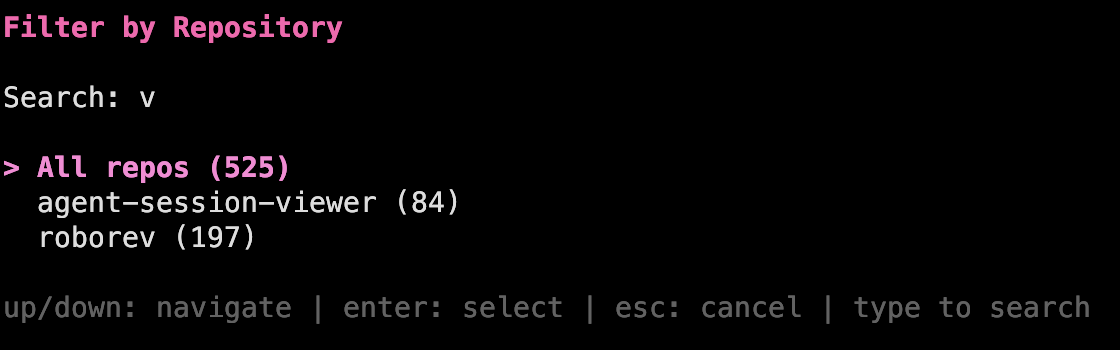
Filter to a single repository with f, or hide completed reviews with h to focus on items needing attention
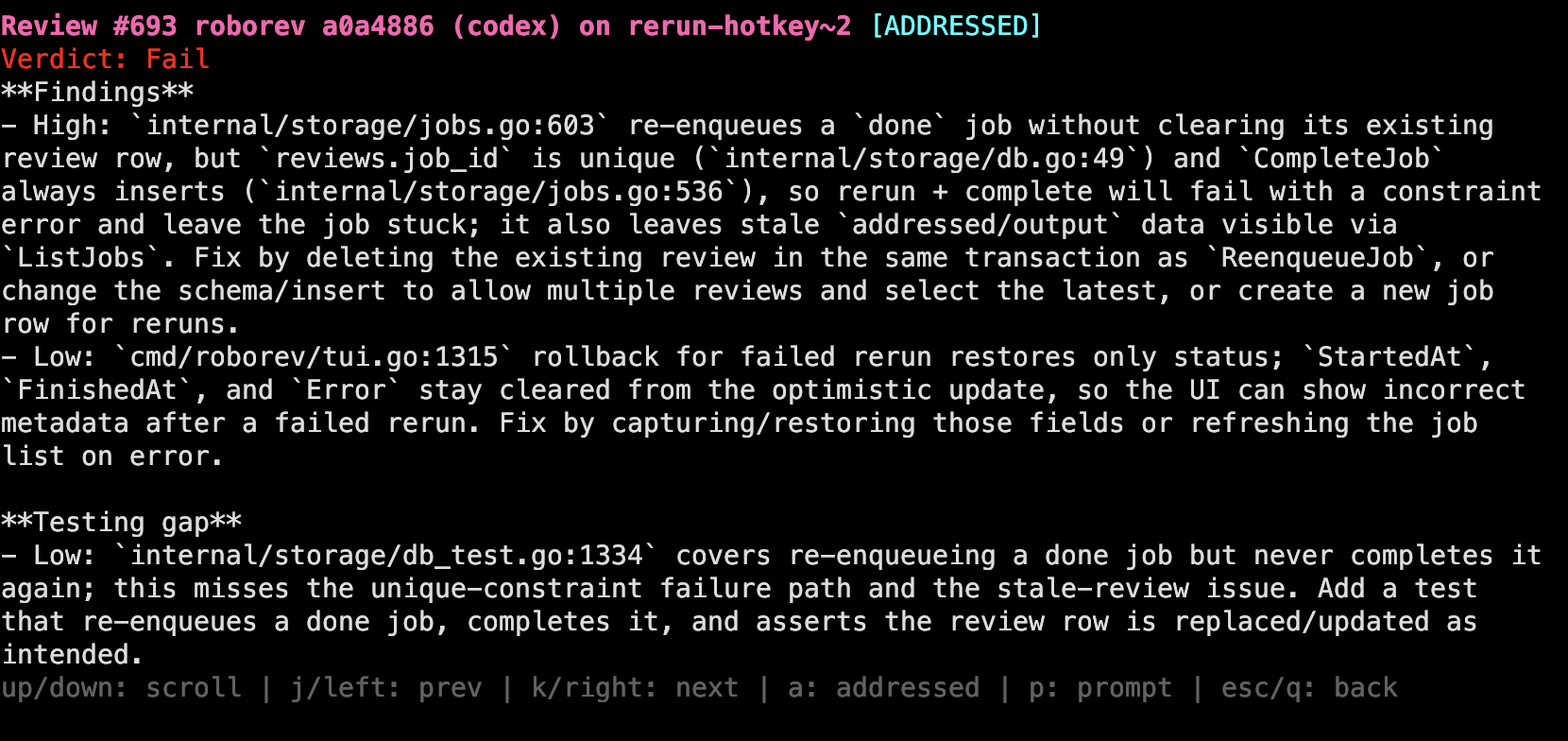
Review/Prompt View:
| Key | Action |
|---|---|
↑/k, ↓/j |
Scroll content |
←/h, →/l |
Previous/next review |
PgUp, PgDn |
Page through content |
a |
Toggle addressed |
p |
Switch between review/prompt |
Esc, q |
Back to queue |
Reviews display a Verdict (Pass/Fail) parsed from the AI response, with color coding for quick triage.
Stream review events in real-time for integrations, notifications, or custom tooling:
roborev stream              # Stream all events
roborev stream --repo .     # Stream events for current repo only
Events are emitted as newline-delimited JSON (JSONL):
{"type":"review.started","ts":"2025-01-11T10:00:00Z","job_id":42,"repo":"/path/to/repo","repo_name":"myrepo","sha":"abc123","agent":"codex"}
{"type":"review.completed","ts":"2025-01-11T10:01:30Z","job_id":42,"repo":"/path/to/repo","repo_name":"myrepo","sha":"abc123","agent":"codex","verdict":"P"}
Event types:
| Type | Description |
|---|---|
review.started |
Review job started processing |
review.completed |
Review finished successfully |
review.failed |
Review failed (includes error field) |
review.canceled |
Review was canceled |
Use with tools like jq for filtering:
roborev stream | jq -c 'select(.type == "review.completed")'roborev fully supports git worktrees. Reviews are stored against the main repository, so commits made in any worktree are associated with the same review history.
# In main repo
git worktree add ../feature-branch feature-branch
cd ../feature-branch

# Reviews work normally - they're stored under the main repo
roborev review --branch
roborev refine
roborev tui
When running commands from a worktree:
- Reviews are stored using the main repository path (not the worktree path)
- The TUI shows all reviews for the repository regardless of which worktree you're in
refinecorrectly finds and addresses reviews for commits in any worktree
This is handled automatically - no configuration needed.
roborev runs as a local daemon that processes review jobs in parallel:
~/.roborev/
├── config.toml    # Global configuration
├── daemon.json    # Runtime state (port, PID)
└── reviews.db     # SQLite database
The daemon starts automatically when needed and handles port conflicts gracefully.
Sync reviews across multiple machines using PostgreSQL as a central store while keeping SQLite as the local primary database. The primary purpose is to consolidate reviews from multiple machines into a single database without duplicates - each review job, review, and response has a UUID that uniquely identifies it across all machines, so PostgreSQL ends up with exactly one copy of each item regardless of which machines have synced.
# ~/.roborev/config.toml
[sync]
enabled = true
postgres_url = "postgres://roborev:${ROBOREV_PG_PASS}@nas.tailnet:5432/roborev"
interval = "1h"           # Sync interval (default: 1h)
machine_name = "laptop"   # Friendly name for this machine
Key features:
- UUID-based deduplication: Each job, review, and response has a globally unique UUID. Local review numeric IDs may differ between machines, but UUIDs ensure PostgreSQL stores only one copy of each item.
- Local-first: SQLite remains the source of truth. CLI commands query SQLite only.
- Graceful degradation: If PostgreSQL is unreachable, everything continues to work. Sync resumes when connectivity returns.
- Schema isolation: Tables are created in a dedicated
roborevschema, avoiding conflicts with other applications. - Remote indicator: Jobs pulled from other machines show
[remote]in the TUI and status output.
Sync commands:
roborev sync status    # Show sync configuration and pending items
roborev sync now       # Trigger immediate sync
What gets synced:
- Completed jobs (done, failed, canceled)
- Reviews with addressed state
- Responses/notes
Jobs in queued or running states remain local-only until they complete.
Environment variable expansion:
Sensitive values can reference environment variables:
postgres_url = "postgres://roborev:${ROBOREV_PG_PASS}@host:5432/db"Set the password in your shell: export ROBOREV_PG_PASS="secret"
Changing sync servers:
When you change the postgres_url to a different server or reset the database, roborev automatically detects this and performs a full resync:
- Each PostgreSQL database has a unique identifier stored in a
sync_metadatatable - On connection, roborev compares this ID with the last synced database
- If different, all local
synced_attimestamps and pull cursors are cleared - This triggers a complete bidirectional sync: all local data is pushed, and all remote data is pulled
This means you can safely:
- Switch between PostgreSQL servers (e.g., dev to prod)
- Reset/recreate your PostgreSQL database
- Sync the same local database to multiple PostgreSQL instances over time
The sync will never be left in an inconsistent state where it thinks data was synced but the target database doesn't have it.
git clone https://github.com/roborev-dev/roborev
cd roborev
go test ./...
make install    # Installs with version info (e.g., v0.7.0-5-gabcdef)
Or use go install ./cmd/... for quick iteration (version shows commit hash only).
MIT


